From White Screens to 87% Lower Memory: A V8-Level Retrospective on Optimizing a Customized ECharts Library
Using V8 internals analysis, this post explains how an inefficient data structure became a memory trap, and how three strategies - array transposition, type separation, and a Dataset architecture refactor - reduced memory usage by 87%. It includes detailed %DebugPrint analysis and before/after benchmark data.
The Trigger: Memory Pressure
During my internship at ByteDance, I worked on a memory optimization task in late July. A neighboring product team hit a white-screen issue. According to customer feedback, once they embedded more than ten charts on a page and loaded one month of data, the browser became unresponsive. After investigation, we confirmed the root cause was excessive memory usage that eventually crashed the browser. The task was assigned to me to see whether we could fix it.
Existing Data Structure: Why Memory Blew Up
I was on an observability team. The backend returned data mostly in Grafana DataFrame format. Internally, we had a shared chart library to provide a consistent charting experience across observability products: it had to be compatible with Grafana DataFrame while also matching Volcengine’s design system.
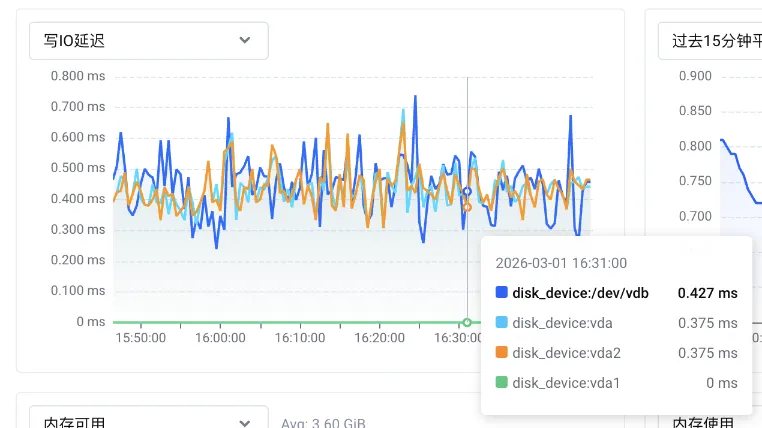
The component I optimized was a time-series chart. Visualization often means large objects and large arrays, so my first instinct was to optimize the data structure itself.
The original scenario can be abstracted as:
- One chart renders m lines
- Each line contains n points
- Each point carries
(x, y)plus meta info (for tooltips, annotations, etc.)
The chart library parsed DataFrame and converted it into ECharts series, so the data looked roughly like this, with each point represented as a tuple:
series: [
  {
    type: "line",
    // "lineStyle","areaStyle", "name", "connectNulls" ...
    data: [[x1, y1, meta1], [x2, y2, meta2], ...]
  },
  {
    type: "line",
    data: [[x1, y1, meta1], [x2, y2, meta2], ...]
  },
];
Memory Cost of Tuples (with V8 Details)
This section includes some V8 internals.
Recommended reading:
Example data points:
[[1772351340000, 0.348785871965, { "unit": "ms" }],
 [1772351370000, 0.380038387716, { "unit": "ms" }], ...]
// index: 0                1              2
// type:  HeapNumber   HeapNumber       Object
The structure is effectively a 3D array: each point is [x, y, metaObj]. metaObj is an object with q fields (string/number/boolean/enum, etc.).
Why Mixed-Type Arrays Are More Expensive
In V8, arrays (JSArray) can be in fast or slow mode. Slow arrays use hash-table storage. Every JS array is associated with an element kind, metadata V8 tracks to optimize array operations. In this scenario, element kind is the relevant factor.
V8 classifies numbers into Smi (small integers) and HeapNumber. Smi is more efficient and can be inlined (4B with pointer compression). Any value beyond 31/32-bit integer range or any floating-point number is stored as HeapNumber, typically 12B each.
V8 chooses different elements kinds based on element types. Pure numeric arrays can use PACKED_DOUBLE_ELEMENTS, which stores raw doubles contiguously. Mixed-type arrays usually degrade to PACKED_ELEMENTS, which is a tagged pointer array and introduces more object allocation plus more GC pressure.
For each point in our time-series data:
xis a 13-digit timestamp, outside SMI range -> HeapNumberyis a float -> HeapNumbermetais an object -> JSObject
So [x, y, meta] uses PACKED_ELEMENTS.
Let’s verify this with debug-v8.
% ./v8/d8  --allow-natives-syntax
V8 version 14.7.126.1
d8> const arr = [1772351340000, 0.348785871965, { unit: "ms" }];
undefined
d8> %DebugPrint(arr);
DebugPrint: 0x15de0104b611: [JSArray]
 - map: 0x15de01028955 <Map[16](PACKED_ELEMENTS)> [FastProperties]
 - prototype: 0x15de01028231 <JSArray[0]>
 - elements: 0x15de0104b5cd <FixedArray[3]> [PACKED_ELEMENTS]
 - length: 3
 - properties: 0x15de000007bd <FixedArray[0]>
 - All own properties (excluding elements): {
    0x15de00000df1: [String] in ReadOnlySpace: #length: 0x15de00887699 <AccessorInfo name= 0x15de00000df1 <String[6]: #length>, data= 0x15de00000011 <undefined>> (const accessor descriptor, attrs: [W__])
 }
 - elements: 0x15de0104b5cd <FixedArray[3]> {
           0: 0x15de01039acd <HeapNumber 1772351340000.0>
           1: 0x15de01039ad9 <HeapNumber 0.348786>
           2: 0x15de0104b5e1 <Object map = 0x15de01039b8d>
 }
0x15de01028955: [Map] in OldSpace
 - map: 0x15de01020131 <MetaMap (0x15de01020181 <NativeContext[306]>)>
 - type: JS_ARRAY_TYPE
 - instance size: 16
1) What storage shape do these three elements use?
From the %DebugPrint output, the tuple is:
JSArray(element kindPACKED_ELEMENTS)elementspoints toFixedArray[3](3 tagged slots, i.e. 3 references)- first two elements are
HeapNumber; the last{unit:"ms"}isJSObject
2) Heap object breakdown for one tuple
After 2020, V8 introduced pointer compression: the heap is limited to a 4GB address space and pointers are stored as 32-bit offsets relative to heap base. So pointers went from 8 bytes to 4 bytes. Many AI-generated analyses miss this.
┌─────────────────────────────────────────────────────────────┐
│                JSArray object header (16 bytes)            │
├─────────────────────────────────────────────────────────────┤
│  Map (4B)       │  points to hidden class (JS_ARRAY_TYPE)  │
├─────────────────────────────────────────────────────────────┤
│  Prototype (4B) │  compressed pointer to Array.prototype    │
├─────────────────────────────────────────────────────────────┤
│  Elements (4B)  │  points to elements backing store         │
├─────────────────────────────────────────────────────────────┤
│  Length (4B)    │  array length (uint32, Smi inline)        │
└─────────────────────────────────────────────────────────────┘
From the debug output:
-
JSArray object body:
%DebugPrint(arr)showsinstance size: 16, so JSArray body = 16B. -
Elements backing store: data is stored in
FixedArray[3], a pointer array. Size = header + 3 slots. With pointer compression, each slot is 4B, so 3 slots = 12B. With alignment plus header, this region is still small (tens of bytes). We estimate ~24B. -
Two HeapNumbers: timestamp (13 digits) and float both require HeapNumber.
%DebugPrintshows each HeapNumberinstance size: 12, so together 24B. -
Meta object (
{ unit: "ms" }):%DebugPrint(arr[2])showsinstance size: 16,inobject properties: 1, andproperties: FixedArray[0](shared empty array). That meansunitis stored in-object, with value#ms. So the object itself is JSObject = 16B. -
String
"ms":arr[2].unitisINTERNALIZED_ONE_BYTE_STRING_TYPE. Internalized strings are typically shared across the isolate, so many points reuse the same string instance. Size is usually object header + 2 bytes of chars + alignment (roughly tens of bytes), but amortized per point it is often near zero.
3) Summary: incremental memory per point
flowchart TB
  subgraph HEAP["V8 Heap Layout"]
    direction TB

    subgraph JSA["JSArray arr (~16B)"]
      direction TB
      J1["map: PACKED_ELEMENTS"]
      J2["properties: FixedArray[0] (shared)"]
      J3["elements: pointer -> 0xELEM"]
      J4["length: 3"]
    end

    subgraph ELEM["FixedArray[3] backing store (~24B)"]
      direction TB
      E1["slot[0] -> HeapNumber(1772351370000) (~12B)"]
      E2["slot[1] -> HeapNumber(0.380038387716) (~12B)"]
      E3["slot[2] -> JSObject({ unit: 'ms' }) (~16B)"]
    end
  end

  subgraph SHARED["Shared"]
    S1["'ms' internalized string (usually reused)"]
  end

  SUM["Rough per-record cost: 16B + 24B + 12B + 12B + 16B ~= 80-90B"]

  J3 -->|"elements pointer"| ELEM
  E3 -->|"unit"| S1
  HEAP --> SUM

  classDef jsa fill:#FEFCE9,stroke:#2563EB,color:#1E3A8A,stroke-width:1.8px;
  classDef elem fill:#E8FAF1,stroke:#059669,color:#065F46,stroke-width:1.8px;
  classDef shared fill:#FFEAEA,stroke:#E11D48,color:#881337,stroke-width:1.5px;
  classDef sum fill:#F3EEFF,stroke:#7C3AED,color:#4C1D95,stroke-width:1.5px;

  class J1,J2,J3,J4 jsa;
  class E1,E2,E3 elem;
  class S1 shared;
  class SUM sum;
If we treat reusable parts (like "ms") as not necessarily incremental, then a tuple’s main incremental cost is:
- JSArray: ~= 16B
- FixedArray[3]: ~= 24B
- HeapNumber x2: ~= 24B
- JSObject(meta): ~= 16B
Total: 16 + 24 + 24 + 16 = 80B (plus minor alignment/metadata variation)
So a practical estimate is:
~= 80-90B per point (order of magnitude)
This is why memory explodes at hundreds of thousands or millions of points:
- Each point is not just two numbers; it is multiple heap objects (HeapNumber, JSObject, JSArray, FixedArray)
- More objects mean higher GC scan cost and fragmentation overhead
- Mixed-type arrays cannot use compact
FixedDoubleArraystorage or lighter GC behavior (details below)
Why Storage Order Matters
Another factor is how data is laid out. It changes the number of subarrays, which changes object count, pointer count, fragmentation, and GC pressure.
Model it as storing x * y primitive values in a 2D array, where x << y:
| Layout | Description | Subarrays | Length of each subarray |
|---|---|---|---|
| Row-major | Store each row contiguously | x | y (large) |
| Column-major | Store each column contiguously | y | x (small) |
The element count is identical, but an array-of-arrays means: more subarrays -> more JSArray objects (each starts at ~16B, plus metadata).
So when x << y, row-major (fewer arrays, longer arrays) is usually better for memory and performance.
Proof sketch:
Memory relationship (scenario: JSArray(length=1000) with elements pointing to FixedDoubleArray[1000]):
%%{init: {"flowchart": {"nodeSpacing": 18, "rankSpacing": 20}}}%%
flowchart LR
  subgraph A["JSArray (arr, body ~16B)"]
    direction TB
    A1["map: PACKED_DOUBLE_ELEMENTS"]
    A2["properties: FixedArray[0] (shared)"]
    A3["elements: 0xELEM (points to FixedDoubleArray)"]
    A4["length: 1000"]
  end

  subgraph B["FixedDoubleArray[1000]"]
    direction TB
    B1["header: ~16B"]
    B2["double[0] (8B)"]
    B3["double[1] (8B)"]
    B4["..."]
    B5["double[999] (8B)"]
  end

  N1["payload: 1000 x 8B = 8000B"]
  N2["total: 16 + 8000 = 8016B (~7.8KB)"]
  N3["raw double contiguous storage (usually no per-element HeapNumber)"]

  A3 -->|elements pointer| B
  B -.-> N1
  B -.-> N2
  B -.-> N3
Array memory composition: each array is first a JSArray object with a fixed header. As shown earlier, JSArray header is 16B, and the actual data is another heap object referenced by elements. So every additional array adds a fixed 16B overhead. More subarrays means more pointers, more objects, more metadata, more fragmentation, and heavier GC.
If we transpose the data and store it as fewer, longer arrays, we can significantly reduce this overhead.
The elements backing store also differs by type, which changes memory efficiency. That’s the next section.
Memory Efficiency of Pure Numeric Arrays
I built a pure 13-digit timestamp array of length 10,000. %DebugPrint shows PACKED_DOUBLE_ELEMENTS, and elements points to FixedDoubleArray[10018]:
d8> const array = [];
d8> new Array(10000).fill(1).forEach((v, i) => { array[i] = 1772351340000 + i;});
d8> %DebugPrint(array);
DebugPrint: 0x15de0104d411: [JSArray]
 - map: 0x15de010288cd <Map[16](PACKED_DOUBLE_ELEMENTS)> [FastProperties]
 - prototype: 0x15de01028231 <JSArray[0]>
 - elements: 0x15de010cd071 <FixedDoubleArray[10018]> [PACKED_DOUBLE_ELEMENTS]
 - length: 10000
 - properties: 0x15de000007bd <FixedArray[0]>
 - All own properties (excluding elements): {
    0x15de00000df1: [String] in ReadOnlySpace: #length: 0x15de00887699 <AccessorInfo name= 0x15de00000df1 <String[6]: #length>, data= 0x15de00000011 <undefined>> (const accessor descriptor, attrs: [W__])
 }
 - elements: 0x15de010cd071 <FixedDoubleArray[10018]> {
           0: 1.77235e+12 (0x4279ca85f3de0000)
           1: 1.77235e+12 (0x4279ca85f3de1000)
           2: 1.77235e+12 (0x4279ca85f3de2000)
...
        9999: 1.77235e+12 (0x4279ca85f64ef000)
 10000-10017: <the_hole>
 }
0x15de010288cd: [Map] in OldSpace
 - map: 0x15de01020131 <MetaMap (0x15de01020181 <NativeContext[306]>)>
 - type: JS_ARRAY_TYPE
 - instance size: 16
...
Why is length 10018, and why are 10000-10017
<the_hole>? JS array capacity is not fixed. When reserved capacity is insufficient, V8 expands. The V8 comment says: in fast mode,length <= elements.length(). The NewElementsCapacity rule (source comment) is:new_capacity = (old_capacity + 50%) + kMinAddedElementsCapacity, wherekMinAddedElementsCapacity = 16.
This highlights a key difference versus tuple storage:
- Tuple storage with mixed types (
PACKED_ELEMENTS) uses tagged pointer slots. Numbers are boxed intoHeapNumber, adding object headers and GC cost. - Pure numeric arrays (
PACKED_DOUBLE_ELEMENTS) store raw doubles in contiguous memory, 8B per element, no per-element HeapNumber allocation, better cache locality, lighter GC.
In simple terms, to store one numeric value:
- Old mixed structure needs
4B (tagged slot with pointer compression) + 8B (HeapNumber payload) = 12B FixedDoubleArraystores it inline as 8B
At large scale, this matters a lot. Besides lower memory usage, the same L1/L2 cache can hold more numbers, reducing CPU stalls waiting for memory.
I previously tried
%DebugPrint(array[42])to infer per-element memory by usinginstance sizeand neighboring addresses. It showedinstance size = 12, and I measured address gaps of 12, so I mistakenly thought each element inPACKED_DOUBLE_ELEMENTSstill cost 12B. That method is wrong: it inspects a boxed temporaryHeapNumberproduced byarray[i]access, not the inline raw double storage.
Side Note: What SMI Arrays Look Like
If you fill an array with small integers, array.elements is FixedArray, with element kind PACKED_SMI_ELEMENTS:
d8> const numArr = Array.from({ length: 10000 }, (v, i) => i);
d8> %DebugPrint(numArr);
DebugPrint: 0x15de010e0ad9: [JSArray]
 - map: 0x15de01028209 <Map[16](PACKED_SMI_ELEMENTS)> [FastProperties]
 - prototype: 0x15de01028231 <JSArray[0]>
 - elements: 0x15de010e0ae9 <FixedArray[10000]> [PACKED_SMI_ELEMENTS]
 - length: 10000
...
 - elements: 0x15de010e0ae9 <FixedArray[10000]> {
           0: 0
           1: 1
           2: 2
           3: 3
For FixedArray, each slot is 4B tagged storage. Each element may be:
- Smi (small integer encoded directly, no heap reference)
- HeapObject pointer (e.g. HeapNumber, String, JSObject)
- Special marker (
the_hole,undefined, etc.)
How does V8 tell whether a tagged value is immediate data or a pointer? It uses Pointer Tagging. In heap pointers, the low bit is tagged as 1 to represent a Strong Heap Object reference.
So if values of the same type are grouped into the same array, memory usage drops significantly and runtime can also improve.
Optimization Plan: Flatten + Transpose to Reduce Objects and Hit Better Elements Kinds
1) Data Transposition: Fewer Subarrays
We used a transposition strategy. The original organization was around m * n * q (or similar dimensions). We changed it to a layout that minimizes array count, for example from m * n * q to m * q * n, reducing subarray count and fixed overhead.
2) Data Flattening: Split metaObj to Avoid One Object per Point
The core optimization was changing meta from “one object per point” to “primitive columns plus index/mapping”:
- Old:
m * n * 3(each point is[x, y, metaObj], andmetaObjis an object) - New: split
metainto primitive columns, making the structure closer to columnar storage For example:m * (2 + q) * n
Benefits:
- Dramatically fewer
JSObjects and tiny arrays - More columns stay pure numeric arrays, so
PACKED_DOUBLE_ELEMENTSis easier to hit - Significantly lower GC pressure and better cache locality from contiguous memory
3) Use Dataset: Less Repetition and Better Reuse
After transposition and flattening, data became a wide table (dimensions x n), which naturally fits ECharts Dataset’s columnar model:
// Before: each series has its own data
option = {
  series: lines.map(line => ({ data: line.points }))
};

// After: one shared dataset, series map via encode
option = {
  dataset: {
    source: [
      ['time', 'line1', 'line2', 'line3', ...],  // first row is dimension names
      [t1, v1_1, v2_1, v3_1, ...],
      [t2, v1_2, v2_2, v3_2, ...],
      ...
    ]
  },
  series: lines.map((_, i) => ({
    type: 'line',
    encode: { x: 0, y: i + 1 }
  }))
};
Compared with nested series.data, Dataset offers:
- Memory efficiency: one shared array structure, fewer nested objects and duplicated metadata
- Data-visual decoupling: data leaves
series.data; Dataset +encodecleanly separate data from presentation mapping - Extensibility: one dataset can map to multiple chart types (line, bar, scatter, heatmap, etc.) without repeated transformation. Adding a new chart type later requires only a new
encodemapping
Results: Significant Memory Reduction
After optimization, memory usage dropped clearly across scenarios:
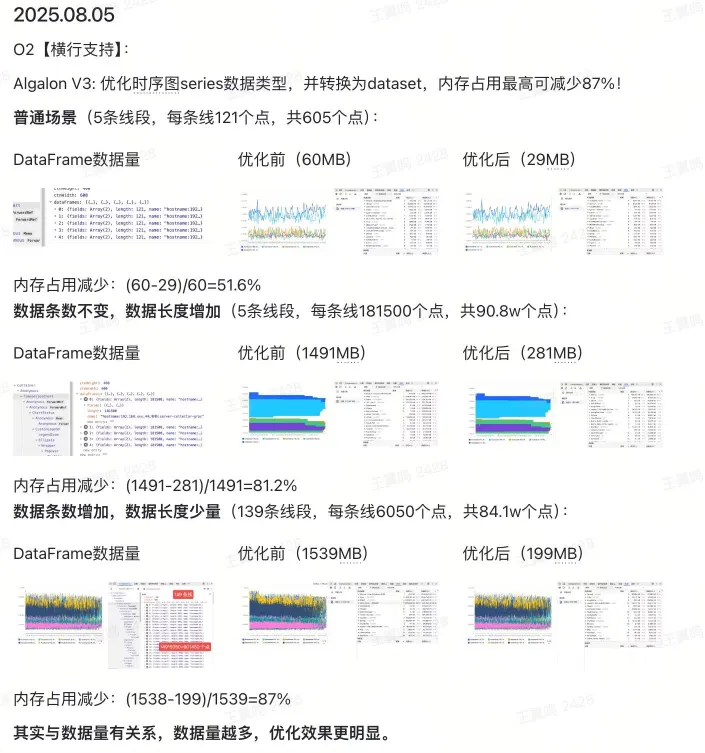
1) Scenario A: Small Data (5 lines, 121 points each, 605 points total)
Before: 60MB After: 29MB Memory reduction: 51.6%
2) Scenario B: Large Data (5 lines, 181,500 points each, 908k points total)
Before: 1491MB After: 281MB Memory reduction: 81.2%
3) Scenario C: More Series (39 lines, 6,050 points each, 841k points total)
Before: 1538MB After: 199MB Memory reduction: 87%
As shown, memory usage dropped substantially, especially in large-data scenarios.
Supporting Optimizations
Along the way, I also shipped several related improvements:
1) Event Callback Optimization
- Before: React
useState+useLayoutEffectto capture ECharts instance - After: plain function callbacks using
thisto access instance, avoiding extra state management - Extra gain: short-circuit when no event binding is needed, skipping listeners entirely
2) Loop Performance
- Replaced
forEach/mapwith nativeforloops to reduce iterator overhead
3) Immutability Fix
- Found that
reverse()in reverse-sorting paths mutated source data unexpectedly - Replaced with
toReversed()(orslice().reverse()) to avoid side effects
6. Summary and Outlook
In large-scale visualization systems, data structure design is often the highest-leverage performance switch. With flattening + transposition + Dataset adoption, we not only eliminated crash scenarios, but also cut memory usage dramatically while improving stability and responsiveness.