This One Move Made My Node Backend Start 75% Faster: Comparing Three TypeScript Startup Methods
In this article, we compare three common startup methods for Node backend services: tsx, tsc, and esbuild. Through practical benchmarks, we show their differences in cold-start time, throughput, and resource usage. In cold-start-sensitive scenarios, pre-bundling with esbuild significantly improves startup speed, up to 75%. Whether you are a developer or a system architect, this helps you choose the right startup strategy for your project and balance developer experience with production performance.
A Node backend project can generally be started in three ways:
- Start directly from source code, such as
tsx src/server.ts - Transpile with
tsc, then runnode dist/server.js - Bundle with a bundler into a single file, such as
esbuild --bundlethennode bundle.mjs
Many people do not really know the practical differences between these methods. In this post, I use concrete tests to compare them.
Test objective
I split the benchmark into two dimensions:
- Startup-stage performance
- Runtime-stage performance
So we can answer three questions:
- How much does cold start differ?
- How much do steady-state throughput/latency differ?
- Is there any significant difference in resource usage?
Methodology
Environment
- macOS arm64
- Apple M5 / 10 cores
- 24GB RAM
- Node v22.22.0
- Express 5.1 (TypeScript)
All three modes use the same src/server.ts with identical business logic, including baseline routes and “mock realistic” routes:
-
Baseline routes (inspired by a benchmark approach used to compare Express 4/5)
- GET /ping: returns
"pong"to measure minimal-path overhead - GET /middlewares: mounts 50 no-op middlewares, then returns
{ ok: true } - GET /json: returns pre-generated ~50KB JSON (fixed content to avoid per-request generation noise)
- GET /payload: returns pre-generated 100KB text
- GET /ping: returns
-
Realistic routes
- GET /route1/info
- GET /route2/stats
- GET /route3/catalog
- GET /route4/summary (aggregates outputs from route1~3)
- GET /orm/users (Drizzle ORM query path)
For ORM, I used drizzle-orm/sqlite-proxy with in-memory mock data, avoiding external DB dependency and reducing network/DB jitter in the comparison.
Load test and sampling rules
- Load test command:
ab -k -n 200000 -c 100 - Each scenario repeated 5 times, using the mean
- Cold start definition: from process
spawnto first/ping200 - Resource sampling: sample
RSSandCPU%every second during load test
Overall Results
1) Cold Start
| mode | cold(ms) |
|---|---|
| esbuild | 104 |
| tsc | 308 |
| tsx | 399 |
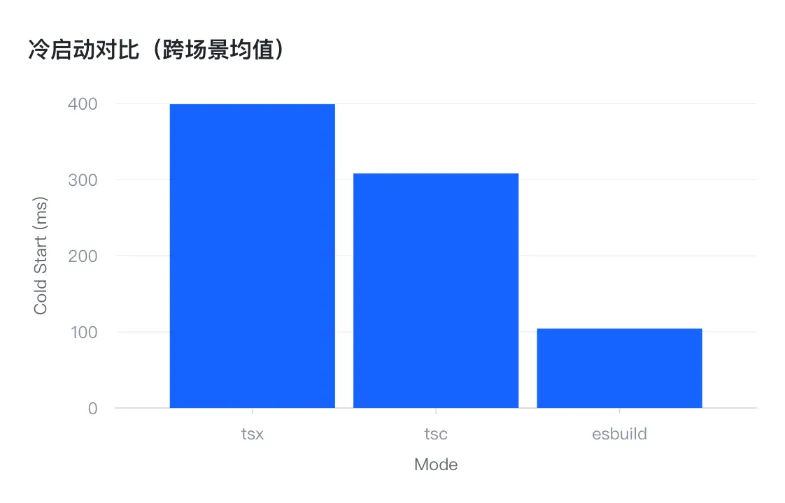
Cold-start difference is obvious. esbuild outperformed tsc and tsx, with up to a 75% gap.
2) Average Throughput (9 scenarios)
| mode | avg req/s |
|---|---|
| tsc | 22114 |
| esbuild | 21959 |
| tsx | 21928 |
Throughput difference is below 1%, so their steady-state performance is nearly identical.
.webp)
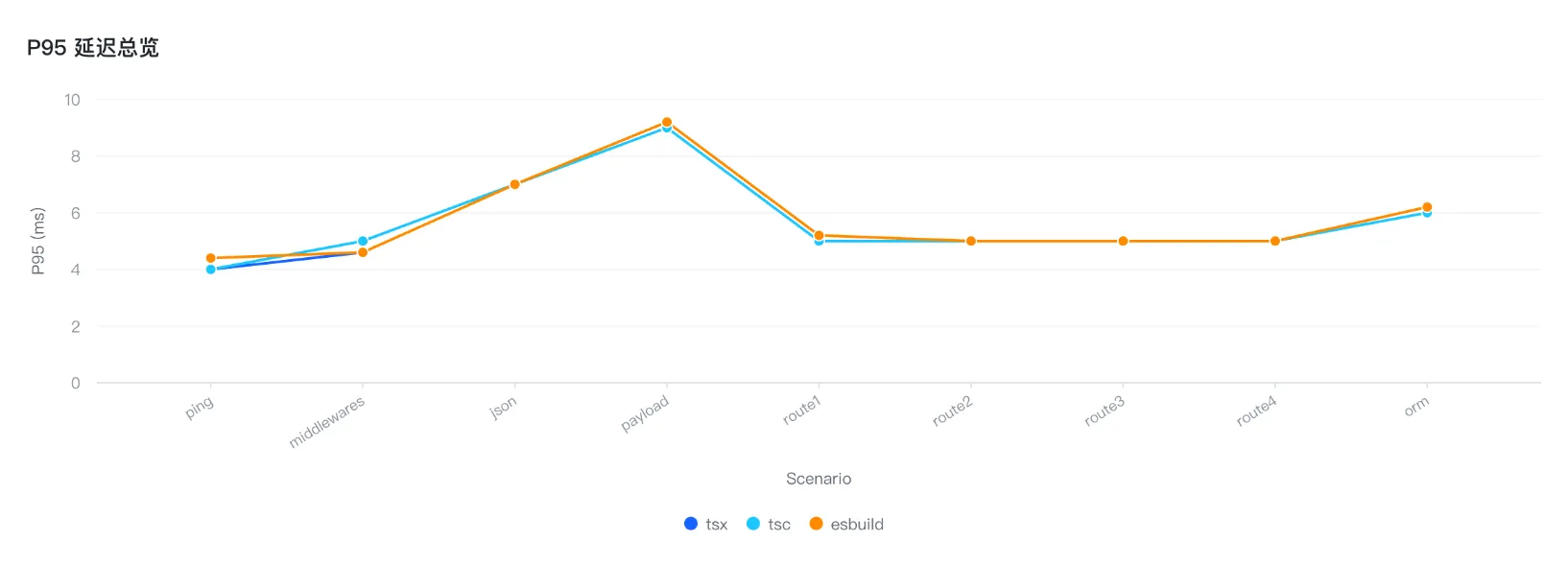
3) P95 Latency
P95 latency is almost the same across all three methods: 5-6ms.
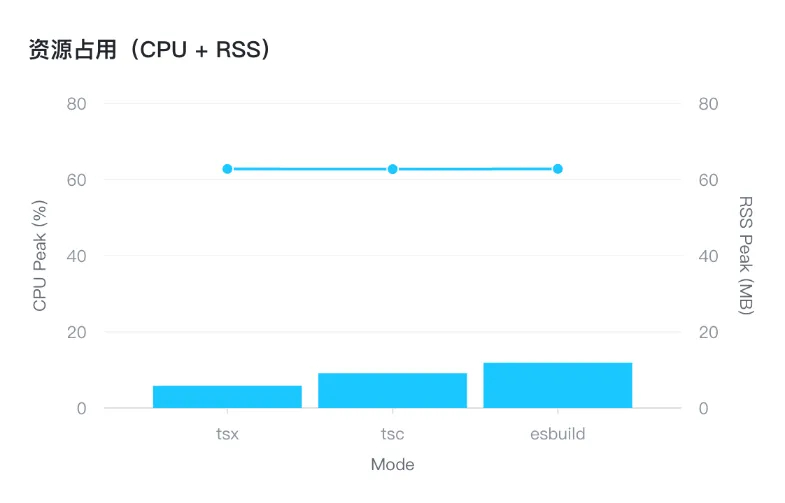
4) RSS Memory
Memory usage is also almost the same, around 62MB.
Test report:
Key Question 1: Why Is Cold Start So Different?
Cold-start time can be decomposed into the following parts:
-
Module graph loading and file I/O
a. Parsing the
importgraph- Static analysis: Node.js analyzes
importstatements in your JavaScript files to determine which modules need to be loaded. It builds a dependency graph before execution.
b. Reading files
- File loading: when Node.js discovers an
import, it reads the corresponding module file based on static analysis results. If it is a JS file (.js/.mjs), Node reads and parses it. - Module lookup: Node resolves module paths, and if a module is not cached, it is read from disk.
c. Building module cache
- Module caching: loaded modules are cached so repeated loads do not re-execute module code.
- Export caching: after execution, exports (
module.exports/export) are stored for later reuse.
- Static analysis: Node.js analyzes
Different startup methods load modules differently:
tsc: multiple compiled JS files.tsx: multiple TS files with runtime transpilation.esbuild: one bundled output file.
By bundling many modules into one file, esbuild reduces module resolution and file I/O overhead, so cold start is much faster.
- Runtime transpilation cost (tsx only)
tsx uses esbuild to compile TypeScript and ESM, and also generates/inlines source maps. At every startup, tsx still incurs extra source-mapping work. tsc output is plain JavaScript, so Node does not need any TypeScript transformation at runtime.
Cold-start conclusion
In edge computing, serverless, short-lived containers, and CLI tools, cold-start speed matters a lot. Pre-bundling with tools like esbuild gives real, measurable cold-start gains.
For long-running API services, cold start happens only once, so the impact is limited.
But there is no free lunch. Pre-bundling with a third-party bundler does have trade-offs.
First, some TypeScript features are not supported. For example, esbuild does not preserve certain behaviors around eval(), and it does not support some tsconfig.json options, such as emitDecoratorMetadata.
Second, debugging gets harder. esbuild output is often heavily transformed and bundled, so runtime code structure differs a lot from original source. For production errors, developers may need extra source maps and tooling to debug efficiently.
Third, startup may incur higher CPU overhead, which leads to the next section.
Key Question 2: Why Is Peak CPU So Different?
Average peak CPU:
| mode | peak CPU% |
|---|---|
| tsx | 5.84 |
| tsc | 9.13 |
| esbuild | 11.89 |
At first glance, esbuild seems more CPU-hungry. But throughput is almost the same. What does that imply?
One possible explanation: after bundling, code structure is denser. During startup, many previously scattered modules may be imported in a tighter form, and some common paths/functions may execute more frequently.
With JIT, V8 may identify these hot paths faster and optimize them. This process is often called hotspot compilation.
V8 JIT (Just-In-Time Compilation)
- V8 is the JavaScript engine used by Chrome and Node.js. It uses JIT to compile JS into machine code at runtime for better performance.
- JIT aims to optimize frequently executed code (“hot code”) into faster machine code.
Hotspot compilation:
- At first, V8 interprets code quickly without aggressive optimization.
- If a code path runs very frequently, V8 marks it as hot and optimizes it.
- Then V8 compiles hot paths in the background into more efficient machine code.
During hotspot compilation, V8 needs CPU to analyze and optimize hot code, which can cause temporary CPU spikes.
Another key point from the charts: throughput is almost identical. That means tsx, tsc, and esbuild process requests at very similar efficiency. If esbuild were fundamentally much more efficient at runtime, throughput should be significantly higher, but data shows the gap is tiny. So the peak CPU difference is more likely from short-term computation overhead, not overall request-processing efficiency.
Ultimately, runtime performance, especially throughput, is more strongly influenced by factors like V8 optimization and I/O behavior, and at the application level by business logic, I/O, JSON serialization, database access, and so on.
Summary
Now we can answer the “which startup method should I use for Node backend services” question:
For development and long-running production API services, tsx is still a good default. Performance differences are small, while developer experience is better.
For cold-start-sensitive scenarios such as cloud functions, pre-bundling with tools like esbuild is recommended. In this case, esbuild cold start was 75% faster than plain tsx.